
Chrome & Edge extension
Column Collapse for Jira
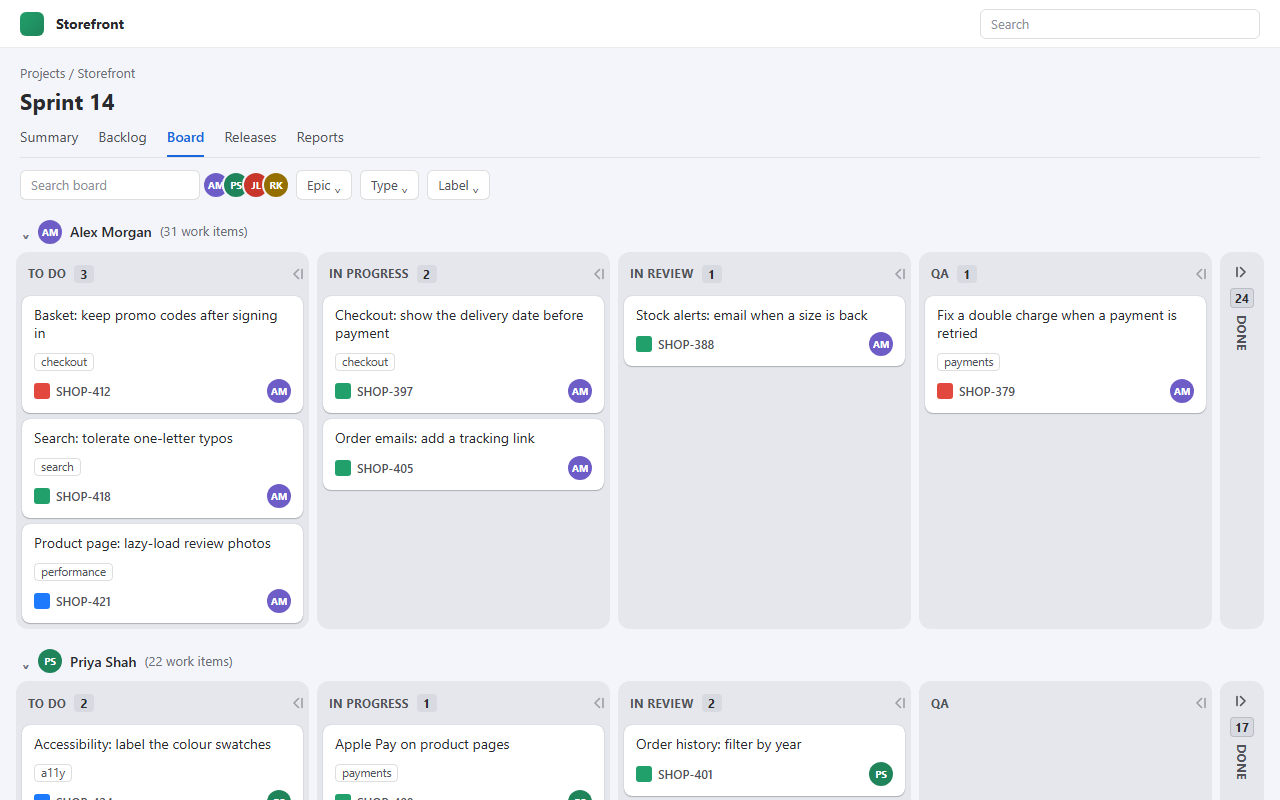
Collapse any column on a Jira board, Done included, in one person's swimlane or in every lane at once. The collapsed column becomes a narrow strip that still shows how many work items it holds.
-
Download it
Version 1.2.0, a 24 KB zip.
Download the extension -
Unzip it somewhere it can stay
Chrome loads the extension from that folder every time it starts, so don't unzip it into Downloads and then tidy it away.
Updating? The zip always has the same name, so it unzips to the same column-collapse-for-jira folder. Let it replace the files, then click the reload icon on the extension's card. If your browser saved it as column-collapse-for-jira (1).zip, delete the old zip first.
-
Load it into Chrome or Edge
Go to
chrome://extensions(oredge://extensions), turn on Developer mode, click Load unpacked and choose the folder. -
Collapse a column
Reload your Jira board. Every column header now has a small button at its right-hand end. Click it to collapse that column in that swimlane, or Shift-click to collapse it in every lane. Click the strip to bring it back.
Each swimlane header also gets Collapse all and Expand all, which work the same way.
Prefer them out of the way? Click the extension's toolbar icon and pick Stacked tabs: a lane's folded columns then stack down its right-hand edge, like tabs in a ring binder.
Turn off Jira Board Enhancer if you have it. It changes the same layout and the two fight.
Good to know
- The count on a strip is Jira's own count for that swimlane, so it is right even when Jira only draws the cards on screen.
- Collapsed columns are remembered per board and swimlane, in your browser only. Everyone else sees the board as normal.
- Jira Cloud only (
yoursite.atlassian.net). Not Jira Data Center or Server. - Updates don't arrive on their own: download the zip again, unzip it over the same folder and click the reload icon on the extension's card.
- It sends nothing anywhere. Privacy policy.